 Dev portal
Standard Private Cloud HA Deployment Guide
Step-by-step guide for provisioning and deploying the iMBrace Platform in High Availability (HA) mode on AWS Private Cloud
Standard Private Cloud HA Deployment Guide
By: iMBrace Limited
Version: 1.2 (2025-10-16)
Author: Kong Lee
Status: Add the deployment of Meilisearch
Converted from the original “Standard Private Cloud HA Deployment Guide.docx”. This MDX preserves the structure and key instructions while formatting commands, tables, and notes for developers and operators.
🗂️ Document History
| Version | Date | Description | Author |
|---|---|---|---|
| 1.0 | 2025-09-25 | Initial version | Kong Lee |
| 1.1 | 2025-10-14 | Add Kafka CLI installation | Kong Lee |
| 1.2 | 2025-10-16 | Add the deployment of Meilisearch | Kong Lee |
🏗️ Infra Architecture
(See “Infra Architecture” section in the source document.)
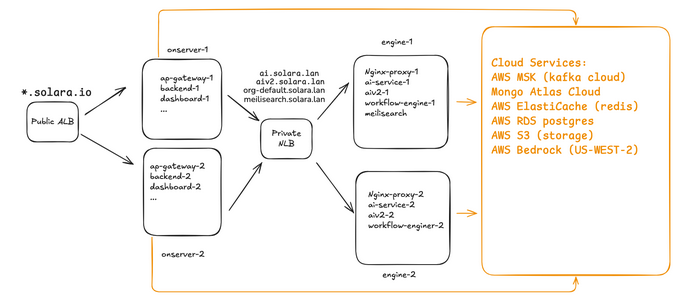
💻 Local Machine Environment
Get the Credentials
- Encrypted zip files are sent to authorized users. They include:
- GitLab full access credentials
- iMBrace IAM programmatic keys
- SSH private key
imbrace-ig
- Decryption will also sent by another email
- Download and save to safe and appropriate location of the local machine
Install Tools (latest versions)
- Install and configure the following the latest version of tools on your local machine
- Git
- Ansible
- VS Code
- Python 3
- SOPS
- AWS CLI — install & configure: https://docs.aws.amazon.com/cli/latest/userguide/getting-started-version.html
Configure a named AWS profile:
aws configure --profile imbrace
AWS Access Key ID [None]: AKIAI44QH8DHBEXAMPLE
AWS Secret Access Key [None]: je7MtGbClwBF/2Zp9Utk/EXAMPLEKEY
Default region name [None]: ap-east-1
Default output format [None]: text
Reference: Named profiles: https://docs.aws.amazon.com/cli/latest/userguide/cli-configure-profiles.html
Clone the Deployment Repository (Local)
git clone https://gitlab.com/imbraceco/partners/private-cloud-ha.git
# Username: imbrace-partner
# Password: (from credentials zip)

cd private-cloud-ha
git fetch --all
git checkout develop
git branch
git pull- Essential directories:
├── ai-service #ai-service application ├── aiv2 #aiv2 application ├── ansible #ansible directory for deployment ├── app-gateway #app-gateway application ├── backend #backend application ├── chat-widget #chat-widget application ├── dashboard #dashboard application ├── ips #ips application ├── kafka #system components: kafka container ├── marketplace #marketplace application ├── nginx #system components: nginx proxy container ├── wfconnectorservice #wfconnectorservice application └── workflow-engine #workflow-engine application - Prepare Target Servers via Ansible
[onserver1] ip_address_onserver1 ansible_python_interpreter=/usr/bin/python3 ansible_user=ec2-user ansible_ssh_private_key_file=$USER/.ssh/imbrace-ig [onserver2] ip_address_onserver2 ansible_python_interpreter=/usr/bin/python3 ansible_user=ec2-user ansible_ssh_private_key_file=$USER/.ssh/imbrace-ig [engine1] ip_address_engine1 ansible_python_interpreter=/usr/bin/python3 ansible_user=ec2-user ansible_ssh_private_key_file=$USER/.ssh/imbrace-ig [engine2] ip_address_engine2 ansible_python_interpreter=/usr/bin/python3 ansible_user=ec2-user ansible_ssh_private_key_file=$USER/.ssh/imbrace-ig [onserver:children] onserver1 onserver2 [engine:children] engine1 engine2 - Run system init for onserver and engine:
cd ansible ansible-playbook -v sysinit-alux9.yml -e hosts_group=onserver -i hosts ansible-playbook -v sysinit-alux9.yml -e hosts_group=engine -i hosts ansible-playbook -v set-credentials.yml -e hosts_group=onserver -i hosts --ask-vault-pass ansible-playbook -v set-credentials.yml -e hosts_group=engine -i hosts --ask-vault-pass- Clone repo on targets:
  ansible-playbook -v clone-repo.yml -e hosts_group=onserver -i hosts
  ansible-playbook -v clone-repo.yml -e hosts_group=engine  -i hosts
Update Application Config Files
Revise the application configuration file (.env) for each application. Decrypt the .env by SOPS
- Export AWS PROFILE so that we can authenticate to iMBrace AWS to access KMS key:
export AWS_PROFILE=imbrace - Access repo application directory, e.g private-cloud-ha/ai-service/
- Decrypt the encrypted secret file secrets.enc.env to secret.env
sops -d ai-service/secrets.enc.env > ai-service/secrets.env - Revise secrets.env accordingly
MONGODB_URI=<mongodb endpoint>
MONGODB_OPENAI_URI=<mongodb endpoint>
MONGODB_BACKEND_URI= <mongodb endpoint>
WORKFLOW_URL=https://api.solara.io:9981
AWS_ACCESS_KEY_ID= <customer_AWS_account_ima_user_imbrace-app-user>
AWS_SECRET_ACCESS_KEY= <customer_AWS_account_ima_user_imbrace-app-user>
AWS_S3_BUCKET=imbrace-data-solara
AWS_S3_URL=<S3 Bucket https endpoint>
- Encrypt the .env by SOPS*
- Encrypt the secret file secrets.env under ai-service
sops -e ai-service/secrets.env > ai-service/secrets.enc.env - Next you will see the encrypted secret file secrets.enc.env
Repeat above steps.
- Repeat above decryption, revision and encryption steps for each application.
- Different applications are located at different directory paths under repo directory.
- E.g. workflow-engine is located at private-cloud-ha/workflow-engine
- Here is the applications directories listing under repo
├── ai-service
├── aichat
├── aiv2
├── app-gateway
├── backend
├── dashboard
├── ips
├── marketplace
├── wcs
└── workflow
Revise nginx proxy configuration
    server {
    listen 80 default_server;
    server_name *.solara.io;
    return 301 https://$host$request_uri;
    }
Revise conf.d/gateway.conf
-
Rule to ai-service
server { listen 80; server_name ai.solara.lan; <== Change this based on the customer domain name location / { proxy_pass http://ai-service:3003; proxy_set_header Host $host; proxy_set_header X-Real-IP $remote_addr; proxy_set_header X-Forwarded-For $proxy_add_x_forwarded_for; proxy_set_header X-Forwarded-Proto $scheme; } } -
Rule to aiv2:
server { listen 80; server_name aiv2.solara.lan; <== Change this based on the customer domain name. location / { proxy_pass http://aiv2:8080; # --- WebSocket --- proxy_http_version 1.1; proxy_set_header Upgrade $http_upgrade; proxy_set_header Connection $connection_upgrade; proxy_read_timeout 3600s; proxy_send_timeout 3600s; proxy_set_header Host $host; proxy_set_header X-Real-IP $remote_addr; proxy_set_header X-Forwarded-For $proxy_add_x_forwarded_for; proxy_set_header X-Forwarded-Proto $scheme; } } -
Rule to meilisearch:
    server {
        listen 80;
        server_name meilisearch.solara.lan; <== Change this based on the customer domain name.
        location / {
            proxy_pass http://localhost:7700;
            proxy_set_header Host $host;
            proxy_set_header X-Real-IP $remote_addr;
            proxy_set_header X-Forwarded-For $proxy_add_x_forwarded_for;
            proxy_set_header X-Forwarded-Proto $scheme;
        }
Revise conf.d/workflow.conf
- Workflow Nginx proxy configuration:
    server {
        listen 80;
        server_name org-default.solara.io; <== Change this based on the customer domain name.
        include /etc/nginx/snippets/shared-security-headers.conf;
        location / {
            proxy_pass http://workflow:5678;
            include /etc/nginx/snippets/shared-proxy-headers.conf;
        }
    }
Push the latest commit to repo
After finishing all revisions for applications config file, you can start to push the latest commit to repo
    git add .
    git commit -m "First Application deployment commit 20250926"
    git push
Allow the target servers to pull the latest commit to repo
Run ansible playbook to allow the target server to pull the latest commits.
ansible-playbook -v clone-repo.yml -e hosts_group=onserver -i hosts
ansible-playbook -v clone-repo.yml -e hosts_group=engine  -i hosts
[At Local]: Deploy the nginx proxy
Run the ansible playbook to deploy nginx proxy container at engine servers only
ansible-playbook -v deploy-nginx-proxy.yml -e hosts_group=engine -i hosts[At Remote]: Install Kafka CLI & Create Topics at MSK Clusters
- We need to install kafka cli at server engine1 to create topics and list topics for MSK clusters.
- SSH to server engine1
- Copy the required script and files from $REPO_HOME to $USER_HOME:
cd /opt/imbrace/repos/private-cloud-ha git pull sh /opt/imbrace/repos/private-cloud-ha/ansible/files/sync-files.sh - Check if the msk-kafka folder in the home directory
ls -ld /home/imbrace/msk-kafka/ drwxr-xr-x. 2 imbrace imbrace 109 Oct 14 07:40 /home/imbrace/msk-kafka/ - Run kafka cli installation script
sh /home/imbrace/msk-kafka/install-kafka-cli.sh - Run create topics script
sh /home/imbrace/msk-kafka/create-topics.sh <bootstrap-servers> ### Example sh /home/imbrace/msk-kafka/create-topics.sh 'b-1.devcuster1.3mwcso.c4.kafka.ap-east-1.amazonaws.com:9098,b-2.devcuster1.3mwcso.c4.kafka.ap-east-1.amazonaws.com:9098' - Run list topics script
sh /home/imbrace/msk-kafka/list-topics.sh <bootstrap-servers>
### Example
sh /home/imbrace/msk-kafka/list-topics.sh 'b-1.devcuster1.3mwcso.c4.kafka.ap-east-1.amazonaws.com:9098,b-2.devcuster1.3mwcso.c4.kafka.ap-east-1.amazonaws.com:9098'
[At Remote]: Deploy applications
SSH to all servers
- Open multiple terminals and ssh to a server per terminal.
Copy and run deploy script to home directory for each server
-
At each server, to run sync files scripts
- At /home/imbrace/
sh /opt/imbrace/repos/private-cloud-ha/ansible/files/sync-files.sh- You should see below two files
ls -ltr -rw-r--r--. 1 imbrace imbrace 237 Sep 25 11:09 app_mapping.txt -rw-r--r--. 1 imbrace imbrace 2458 Sep 25 17:35 deploy-apps.sh -
onserver, revise app_mapping.txt
# Format: <folder> <service> app-gateway app-gateway backend backend chat-widget chat-widget dashboard dashboard ips ips marketplace marketplace wfconnectorservice wfconnectorsvc -
Run the deployment script
sh deploy-apps.sh -
engine, revise app_mapping.txt
# Format: <folder> <service> ai-service ai-service aiv2 ai-v2 workflow-engine workflow -
Run the deployment script
sh deploy-apps.sh -
Restart Nginx Proxy
docker restart nginx-proxy
Notes & References
- Replace all occurrences of solara.io / solara.lan with the customer’s domains.
- Keep encrypted secrets in Git; never commit plaintext .env.
- Ensure AWS profile imbrace is configured on all machines.
Standard HA Infra Configuration and Provision Guide on AWS Private Cloud
Detailed guide for provisioning iMBrace Platform in High Availability (HA) mode within AWS Private Cloud environments
Standard Private Cloud Single Node Deployment Guide
Step-by-step guide for provisioning and deploying the iMBrace Platform in Single Node mode on AWS Private Cloud